
Board Meeting Notes Template
Taking notes in a board meeting is easier when the template follows the agenda. Enter each agenda item with its time allowance and presenter, and the tool builds a timed note-taking sheet: a clock shows how long the current item has run against its allowance, and each item has space for key points, decisions and action items. At the end, export tidy notes and an action list — the raw material for formal minutes.
- Free to use
- No sign-up
- Runs in your browser
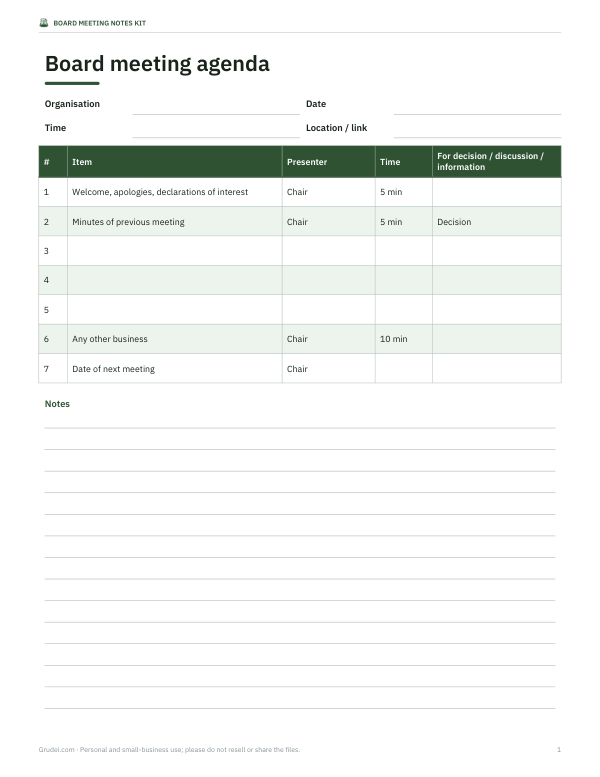
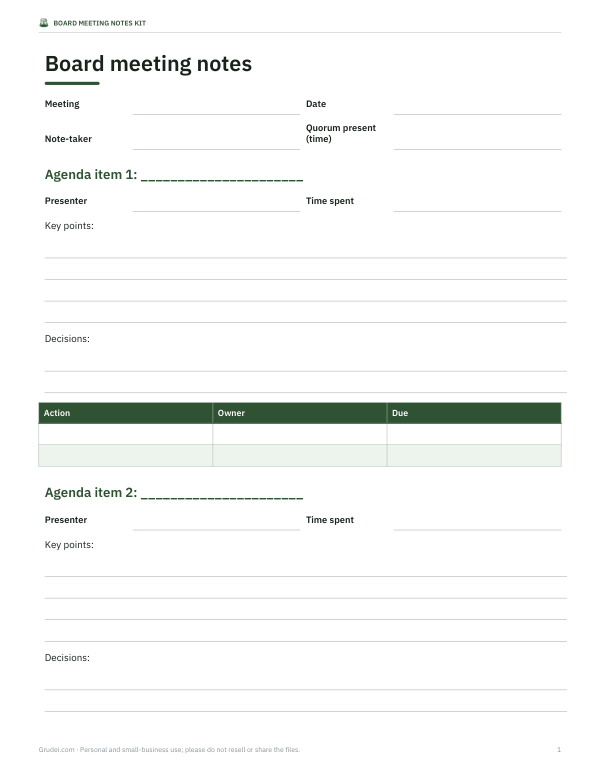
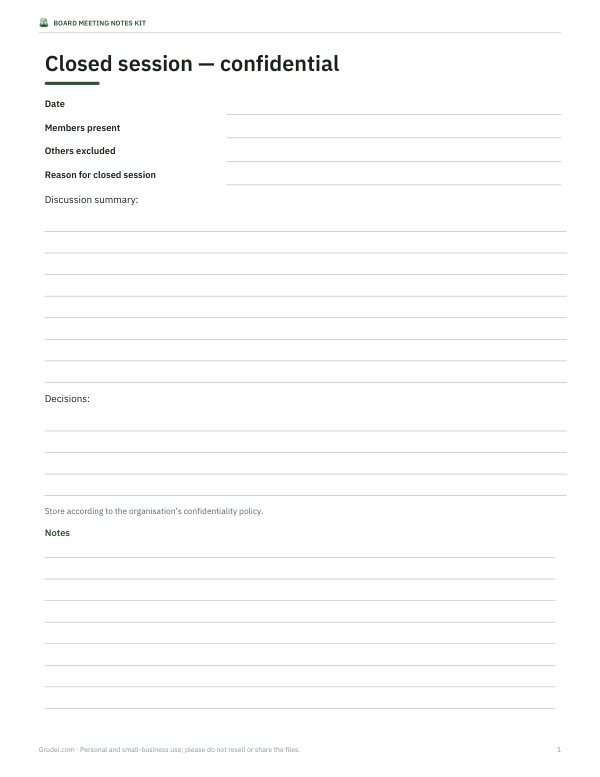
Board meeting notes
Board Meeting Notes Kit
Board meeting notes templates: a timed agenda template, a note-taking sheet with decisions and actions per item, a closed-session notes page, an action tracker workbook with status and overdue flags, and a notes-to-minutes checklist.
- Timed agenda (DOCX/PDF)
- Notes sheet (DOCX/PDF)
- Closed session notes (DOCX)
- Action tracker (XLSX)
- Minutes checklist (PDF, DOCX)
Formats: DOCX, PDF, XLSX. Instant download after payment (link valid 72 hours, up to 5 downloads). AI-assisted: the templates were drafted with AI help and reviewed and laid out before publishing.
$5.00 USD, one-time 5 files · about $1.00 each
- Instant download
- 7-day refund
- Secure checkout by Stripe
7-day money-back guarantee. Full refund within 7 days of purchase, even after you download.
Free sample: Board Action Tracker (PDF, 57 KB)
Full refund within 7 days — see the refund policy and license.
Free printables
Single sheets you can print right now, no sign-up. The full pack adds every sheet in one download plus the editable files.
 Printable Board Action Tracker
 Printable Minutes Checklist
Notes versus minutes
Meeting notes are the working record taken during the meeting: what was said on each item, the decisions reached and who agreed to do what. Minutes are the formal, approved record written afterwards from those notes. Good notes make good minutes easy — the secretary or clerk can turn them into minutes in a fraction of the time, and nothing important depends on memory. This tool is designed for the notes; our separate advice below covers turning them into minutes.
How to use the note sheet
- Enter the board name, date, start time and attendees.
- Paste the agenda: one item per line with its time allowance and presenter.
- Press “Build note sheet”. Each item gets boxes for key points, decisions and actions, with its planned start time.
- When the meeting starts, press “Start / next item”. A clock shows time spent on the current item against its allowance and turns red when it runs over.
- Type notes as you go. Everything is saved automatically in this browser.
- At the end, download the notes as text and the action items as a CSV for your tracker.
What to capture for each agenda item
| Capture | Example |
|---|---|
| Key points | Q3 income 8% below budget due to lower ticket sales |
| Questions raised | Trustee asked about impact on reserves policy |
| Decisions | Board approved revised budget with £12k reduction in marketing |
| Votes (if formal) | Motion proposed by Treasurer, seconded by Chair; carried 6–0 |
| Actions | Treasurer to circulate revised budget | Treasurer | 15 Nov |
| Deferred items | Pay review deferred to December meeting |
Tips for taking board notes
- Write decisions and actions word for word; paraphrase discussion.
- Record who is responsible for each action and by when.
- Note declarations of interest and when members leave the room.
- Don’t try to capture every comment — summarise the main points and conclusions.
- Ask the chair to confirm the wording of a decision before moving on if it is unclear.
- Note start and end times, and when quorum is present.
Keeping the meeting on time
Board meetings commonly overrun on reports and under-spend time on strategy. A timed agenda helps the chair steer: when the clock turns red, the chair can summarise, ask for a decision or defer the item. Reviewing how long each item actually took (shown in the downloaded notes) helps plan better agendas next time. Put decision items early, when attention is highest, and send reports in advance so meeting time can be spent on questions rather than presentations.
Turning notes into minutes
- Start from the approved minutes template your organisation uses.
- List attendees, apologies and whether the meeting was quorate.
- For each item, write a brief neutral summary and the exact decision.
- Record formal motions and votes where your rules require them.
- Copy the action list with owners and due dates.
- Send the draft to the chair for review, then circulate for approval at the next meeting.
Minutes should be accurate and neutral; avoid attributing opinions to individuals unless your organisation’s practice requires it or a member asks for their dissent to be recorded.
Agenda timing guide
| Item type | Typical allowance |
|---|---|
| Opening, apologies, interests | 5 minutes |
| Previous minutes and matters arising | 5–10 minutes |
| Chief executive or director report (pre-read) | 10–15 minutes |
| Finance report | 15–20 minutes |
| Strategic discussion | 25–40 minutes |
| Committee reports | 5 minutes each |
| Any other business | 5–10 minutes |
After the meeting
- Send the action list to owners within a day, while the discussion is fresh.
- Share the draft minutes with the chair within a week.
- Add open actions to the next agenda under “matters arising”.
- File the notes according to your records policy once the minutes are approved.
Confidential items
Some boards discuss confidential matters — staff issues, legal advice or commercially sensitive negotiations — in a closed session. Keep notes for those items separately and follow your organisation’s policy on who can access them. Because this tool keeps notes only in your browser, clear them (or use a private window) on a shared computer.
Worked example
At a trust board meeting starting at 18:00 with six agenda items totalling 80 minutes, the secretary builds the note sheet before the meeting. During the finance item the clock turns red at 20 minutes; the chair calls for a decision and the board approves a revised budget. The secretary records the decision and two actions. After the meeting they download the notes, email the action CSV to the director and draft minutes the same evening.
Privacy
The notes tool runs entirely in your browser. Notes are saved to this browser’s local storage and are never uploaded.
Frequently asked questions
What is the difference between meeting notes and minutes?
Notes are the working record taken during the meeting; minutes are the formal approved record written from them.
What should board meeting notes include?
Key points, decisions, votes where needed, and action items with owners and due dates.
Does the tool save my notes?
Yes, in this browser’s local storage.
Can I export the action items?
Yes, as a CSV file.
What does the timer do?
It shows time spent on the current item against its allowance and highlights overruns.
Who usually takes board meeting notes?
The secretary, clerk or governance officer, sometimes with a staff minute-taker.
Can I use it for committee meetings too?
Yes, it works for any meeting with an agenda, such as finance or governance committees.
Should notes record every comment?
No; summarise discussion and record decisions and actions precisely.
Is anything uploaded?
No, everything stays on your device.